Why this works
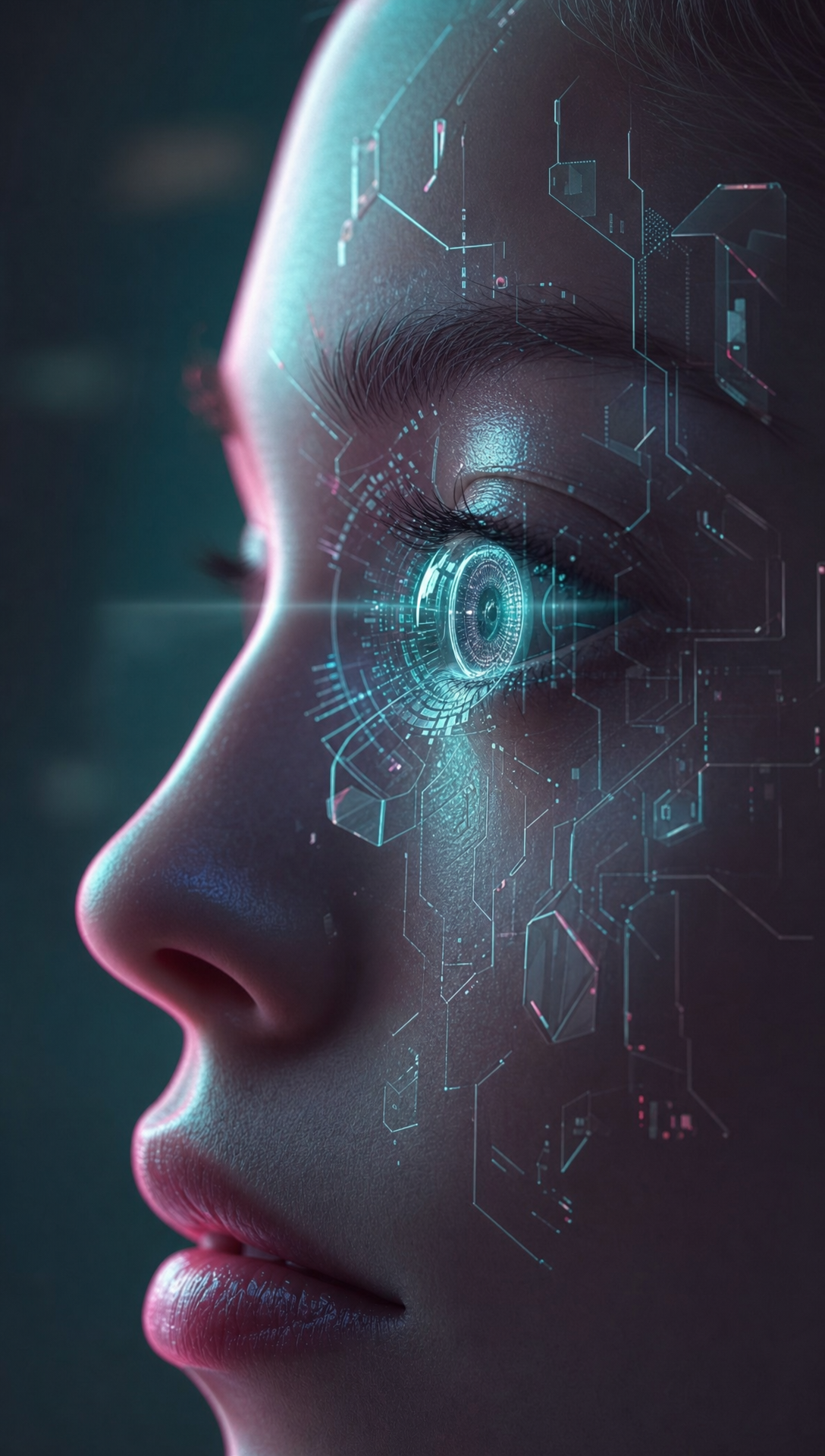
The “close-up side-profile portrait” and “sharp focus on the eye lens glow” make the AR contact lens the clear compositional anchor, while “cinematic depth of field” pushes the dark background into a soft supporting role. “Teal-and-magenta neon rim lighting instead of pure blue” produces the image’s teal, pink, and black harmony and gives the futuristic subject a more vivid, less monochromatic mood. “Faint translucent holographic UI panels,” “geometric memory shards,” and “soft scanning beams” add layered intelligence and mystery without overpowering the photorealistic skin texture.
FAQ
→How do I make the holographic interface more prominent than the woman’s eye?
Replace “sharp focus on the eye lens glow and surrounding projection effects” with “sharp focus on the expanded holographic interface, with the eye lens secondary.” Change “faint translucent holographic UI panels” to “large, dense translucent holographic UI panels extending across the face,” and add “interface elements occupying the foreground.”
→How do I shift this from mysterious and cinematic to a brighter, optimistic technology mood?
Replace “dark softly blurred background” with “bright clean laboratory background with soft atmospheric haze,” and change “teal-and-magenta neon rim lighting” to “soft cyan, lavender, and warm white studio lighting.” Replace “geometric memory shards” with “friendly rounded holographic icons and translucent data ribbons” to remove the more enigmatic visual cues.
→How do I create a matching series with different AR subjects while keeping this visual identity?
Keep the phrases “photorealistic sci-fi,” “teal-and-magenta neon rim lighting,” “cinematic depth of field,” “realistic skin texture,” and “dark softly blurred background” unchanged. Replace “a woman wearing a futuristic augmented-reality contact lens” with a consistent subject template such as “a male astronaut wearing a transparent AR visor,” “an android with an illuminated optical implant,” or “a mechanic using a holographic monocle,” while retaining “sharp focus on the eye lens glow and surrounding projection effects.”
Learn the technique behind this
- Why can't AI spell, and how do I get readable text in an image? — Older diffusion models had no character-level representation of text, so they produced letterform-shaped texture instead of words.
- How should a prompt be structured, and does word order matter? — A prompt that behaves predictably names one subject first, then what it is doing, then where, then the light, then the lens or medium, then the style.
- Why does AI get hands and faces wrong, and how do I fix it? — Hands fail because they're small in frame, extremely variable in pose, and self-occluding — the model has less usable signal per pixel than for any other body part.
Related prompts
Woman in Teal Light, Shadowed Fashion Portrait
Eerie Elegance Among Marble Busts
Charcoal turtleneck with red eye-beam
Dreamy Macro Portrait in Cool Water