Why this works
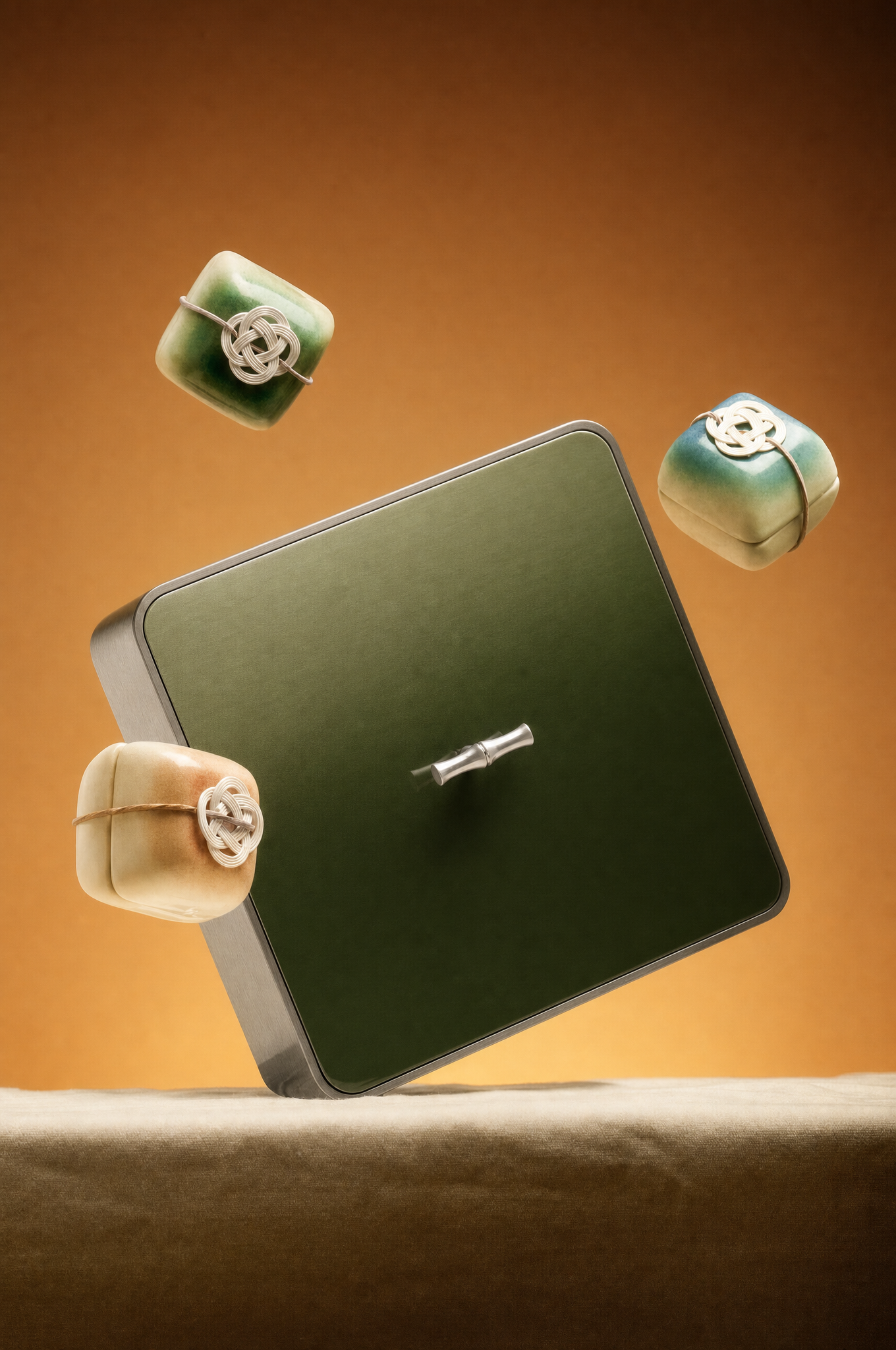
The centered close studio framing makes the square luxury gift box the visual anchor, while “three smaller wrapped cubes floating around it” adds controlled depth without disrupting the clean minimal composition. “Warm amber gradient background” supplies the warm brown and beige field seen in the image, and “brushed silver accent” introduces a restrained metallic contrast against the earthy palette. “Soft diffused dramatic lighting with gentle rim highlights” separates the boxes from the background, while “shallow depth of field” keeps attention on the main box and softens the surrounding cubes.
FAQ
→How do I make the central gift box feel more dominant and imposing?
Replace “three smaller wrapped cubes floating around it” with “three smaller wrapped cubes receding into the background,” and change “Close studio framing” to “tight close-up framing with the central box filling most of the image.” Add “low camera angle” after the camera description to give the square box more visual authority.
→How do I change the warm luxury mood into a cooler, more modern presentation?
Replace “Warm amber gradient background” with “cool charcoal-to-slate gradient background,” and change “Warm” in the mood description to “cool, refined, contemporary.” Replace “gentle rim highlights” with “crisp cool rim highlights” and “brushed silver accent” with “polished chrome accent” for a sharper metallic finish.
→How do I create a set of coordinated variations from this gift-box prompt?
Keep “centered,” “clean minimal composition,” and “photorealistic studio product photography” unchanged, then swap only the material and palette phrases. For example, replace “brushed silver accent” with “matte gold accent,” “Warm amber gradient background” with “deep burgundy gradient background,” and “realistic paper and metallic textures” with “realistic velvet and satin textures” to make a richer holiday variation.
Learn the technique behind this
- Why can't AI spell, and how do I get readable text in an image? — Older diffusion models had no character-level representation of text, so they produced letterform-shaped texture instead of words.
- How should a prompt be structured, and does word order matter? — A prompt that behaves predictably names one subject first, then what it is doing, then where, then the light, then the lens or medium, then the style.
- Why does the model ignore parts of my prompt? — Ignored instructions are almost always conflicts, counts, or spatial relationships — three things current models handle badly — rather than the model failing to read you.
Related prompts
Playful brunette beauty ad portrait
Red Lip Balm with Lychee Freshness
Premium wellness pouch with golden spices
Teal-Accented Bunny Toy Studio Portrait