Why this works
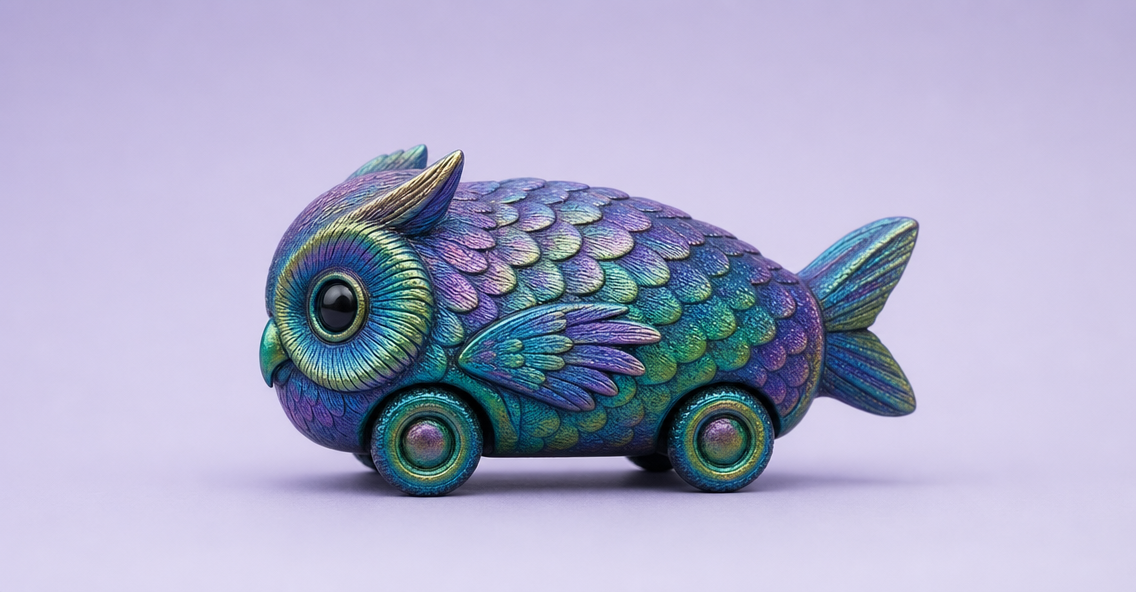
The phrase “owl-fish hybrid form with subtle feather-like ridges and short wing fins” gives the toy its readable creature identity, while “holographic scales wrapping the body” supplies the blue, teal, green, and pink color shifts visible across the glossy surface. “Centered on a clean soft lavender background” creates the uncluttered, catalog-like framing and makes the compact car silhouette easy to inspect. The playful futuristic mood comes from the combination of “surreal iridescent toy car,” “colorful holographic scales,” and “whimsical futuristic composition,” while “soft diffused lighting” paired with “crisp reflections” preserves a polished product-shot finish rather than a flat illustration.
FAQ
→How do I make the owl features more central and recognizable?
Replace “subtle feather-like ridges and short wing fins” with “large forward-facing owl eyes, layered feather panels around the hood, and clearly articulated swept wings.” Keep “owl-fish hybrid form,” but add “owl face as the dominant front-end feature” so the creature identity does not get lost beneath the scales.
→How do I shift this from playful to darker and more mysterious?
Replace “clean soft lavender background” with “deep indigo studio background with a faint reflective surface,” and change “soft diffused lighting” to “moody rim lighting with a narrow overhead spotlight.” Swap “whimsical futuristic composition” for “eerie futuristic concept-object composition,” while retaining “crisp reflections” to keep the body’s holographic finish legible.
→How do I create a consistent series of variations from this toy car?
Keep the fixed anchors “photorealistic studio product shot,” “centered,” “soft diffused lighting,” “ultra-sharp detail,” and “glossy high-spec finish.” Change only the creature phrase, such as replacing “owl-fish hybrid form” with “fox-manta hybrid form,” and replace “soft lavender background” with a controlled palette like “soft mint background” or “pale peach background” for each model.
Learn the technique behind this
- Why can't AI spell, and how do I get readable text in an image? — Older diffusion models had no character-level representation of text, so they produced letterform-shaped texture instead of words.
- How should a prompt be structured, and does word order matter? — A prompt that behaves predictably names one subject first, then what it is doing, then where, then the light, then the lens or medium, then the style.
- Do negative prompts work, and what should go in one? — Negative prompts work on models that support a separate negative conditioning channel — mainly Stable Diffusion and FLUX-family models.
Related prompts
Playful brunette beauty ad portrait
Red Lip Balm with Lychee Freshness
Premium wellness pouch with golden spices
Teal-Accented Bunny Toy Studio Portrait